

A guide to posting jobs on the AngelList Talent platform.

There are over 2,000,000 active candidates looking for jobs on AngelList Talent, and connecting with them by posting a job is completely free.
While our job posting tool is straight-forward and intuitive, this guide will go a bit more in depth, walking you step by step through the process of posting a job to the Talent platform and maximizing your visibility to candidates.
By going through the below steps, you should be able to quickly post a job while getting the most attention possible from your target candidates. If you have any questions, we've included a link at the bottom for you to reach out.
Note: This guide is specifically for companies not using an AngelList-compatible applicant tracking system. If you are using an ATS that syncs with AngelList, we recommend synchronizing your ATS data instead of posting jobs individually.
There are a number of ways to get to your new job form, but the fastest takes just two clicks. First, click the “Recruit” tab on the AngelList site:
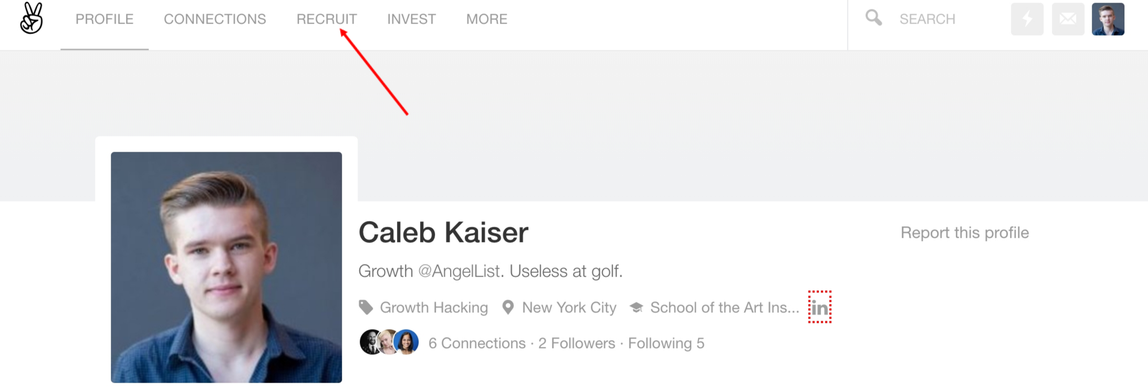
This will direct you to the Talent dashboard. Once the dashboard loads, click the “Post Job” button in the sidebar:

Clicking the “Post Job” button will take you to the new job form, where you can begin filling in your job details:

There's a balance to writing a job post that will appeal to a high volume of job searchers, while still targeting the right candidates. Typically, companies who get this balance wrong go in one of two directions:
The key here is to be realistic about the skills you need, and thorough in explaining the role.
Starting with the job description, you want to explain not just what the qualifications for the job are, but what the candidate would be doing if they took the role. What parts of your product/company would they specifically be responsible for? How would they fit into your broader organization? What do they need to know about your culture?
The more thorough your description, the more you will self-select for better candidates.
You also want to be realistic about the skills and experience you need. If you're willing to hire someone with 2 years of experience who shows great aptitude, say that. Many companies inflate their listed requirements to weed out candidates, but in general, this strategy backfires. Clicking “no” on an under-qualified candidate takes roughly five seconds. Missing out on a great candidate is much worse than a few wasted minutes.
Occasionally, when selecting the skills required for your job, you will see duplicate skills suggested. This happens because we allow users to submit their own skills. We do this because new technologies and methodologies are constantly emerging, and we don't want to limit our users.
While we manually review the skills that are added and merge duplicates, there is sometimes a lag, meaning you'll see duplicate skills. In this scenario, pick the skill with the most followers, as it will receive the most visibility until we merge the duplicate skills:

One of the things that separates AngelList Talent from other talent platforms is that the majority of our job postings include accurate salary and equity data. In fact, candidates using AngelList expect any job posting they see to have compensation information included. Because of this, job postings that omit salary and equity data will not appear in job searches, with the exception of Premium Jobs, which we'll explain below.
If you have concerns about posting compensation data, please see the bullets below. If none of these answer your question, feel free to reach out to [email protected] to see if we can't address.
If you need more help setting the right compensation, you can use our free salary tool, or contact [email protected] to speak with a member of our team.
Setting the right recruiting contact for a role is simple. You click from the dropdown list, select the right contact, and then add other recruiters from your team:

It is critical, however, that your email address is your work email.
Most AngelList users created their accounts before recruiting for their company, and as a result, their personal email addresses are attached to their accounts. Whatever email address is attached to your account is the one that will receive updates and notifications when candidates apply. In most cases, you want to receive updates about applicants in your work inbox—and so it is imperative that you update your profile to make sure that your work email is the correct one.
You can do this quickly in your Settings page:

Once your email is updated correctly, you're ready to submit your job.
We've tried to cover as much as possible in the above steps, but of course, there will always be unique circumstances we didn't anticipate. If there's something not covered in this guide that you'd like to know more about, you can always drop us a line at [email protected]. Someone will be in touch immediately to help!